Choosing facility management software is really a question of which jobs it needs to do well, how painful it is to get your existing data into it, and how easy it would be to leave if it doesn't work out. Intrac prices its plans at 1.95%, 2.95% or 3.95% of monthly revenue across Basics, Essentials and Premium, with no lock-in contracts, which changes the calculation compared to a flat monthly seat fee. But pricing is only one part of the decision.
This article is for facility managers evaluating or switching booking, membership, class and payment software for a sports facility, swim school or multi-sport academy. It covers the core jobs the software actually needs to cover, what payment compliance means in practice, what's genuinely hard about data migration versus what's marketing, and what to ask a vendor before committing.
- The core jobs the software actually needs to do
- What payment compliance actually means for your facility
- Direct debit vs card billing for recurring memberships
- What's genuinely hard about data migration
- Can you actually trust the reporting at end of day and end of month?
- The staff and parent experience matters as much as the back end
- Evaluating vendors: trial scope, support and exit terms
The core jobs the software actually needs to do
Most facilities need bookings, memberships, enrolments, point of sale, staff rostering, payroll and payments to work together, because that's how the business actually runs day to day. A family paying for a swim lesson is also potentially booking a court, buying from the kiosk, and relying on the right coach being rostered on. Software that handles one of those jobs brilliantly but leaves the rest disconnected tends to push the disconnect back onto staff, who end up reconciling between systems manually.
Before comparing feature lists, write down the actual jobs your facility needs covered in a normal week, and check each vendor against that list specifically, rather than being drawn in by a feature you don't actually need.
- Bookings, memberships, POS, rostering and payments working together matters more than any single standout feature.
- Disconnected systems push reconciliation work back onto staff.
- List your facility's actual weekly jobs before comparing vendors' feature lists.
What payment compliance actually means for your facility
PCI DSS applies to any business that accepts, processes, stores or transmits card payment data, regardless of size, and it doesn't disappear just because you're using a SaaS provider. Using a compliant platform reduces your exposure, but the responsibility for how card data is handled at your facility doesn't transfer away entirely just because someone else built the software.
Ask any vendor directly how card data is handled, stored and processed, and whether their platform is built to keep you out of scope for the more burdensome PCI requirements. A vague answer here is worth paying attention to. It's not a detail to leave until after you've signed.

Direct debit vs card billing for recurring memberships
Both bank-to-bank direct debit and card billing are established ways to collect recurring membership and term fees in Australia, and the right choice depends on your family base and cash flow needs more than either option being universally better. Card billing tends to settle faster and integrates more naturally with online booking and payment flows; direct debit can suit facilities with longer billing cycles or lower card-processing appetite.
Whichever you choose, make sure failed payments and retries are handled automatically by the software, not manually by front-desk staff chasing a declined card between classes.
What's genuinely hard about data migration
The genuinely hard parts of a software migration are historic enrolments, make-up credits, family links across siblings and accounts, and payment history that needs to stay reconcilable after the switch. These are the details that get glossed over in a sales conversation and then cause real pain in week one if they're not handled properly: a family losing a credit they're owed, or a sibling relationship breaking so a parent can't see both kids' bookings in one login.
What's usually not hard, despite how it's sometimes marketed, is importing a basic contact list or class timetable. Ask specifically how a vendor handles credits, family links and payment history, not just whether they can "import your data" in general terms.
- Historic enrolments and attendance records.
- Make-up credits and their expiry rules.
- Family and sibling account links.
- Payment history that needs to remain reconcilable after the switch.
Before migrating, export a handful of your trickiest real family records, the ones with credits, siblings and a payment dispute history, and ask the new vendor to show you exactly how those specific records would look after migration, not a generic demo account.
Can you actually trust the reporting at end of day and end of month?
A reporting screen that looks comprehensive is only useful if the numbers on it actually reconcile against what was banked. End-of-day reconciliation that requires a staff member to manually cross-check a POS report against a banking statement is a sign the software isn't doing its job, no matter how polished the dashboard looks.
Ask to see an actual end-of-day and end-of-month report during evaluation, not just a dashboard screenshot, and check whether it would answer the questions you actually get asked, by an owner, an accountant or an auditor, without extra manual work. Our guide to checking booking payments and reports each day covers what that routine looks like in practice.

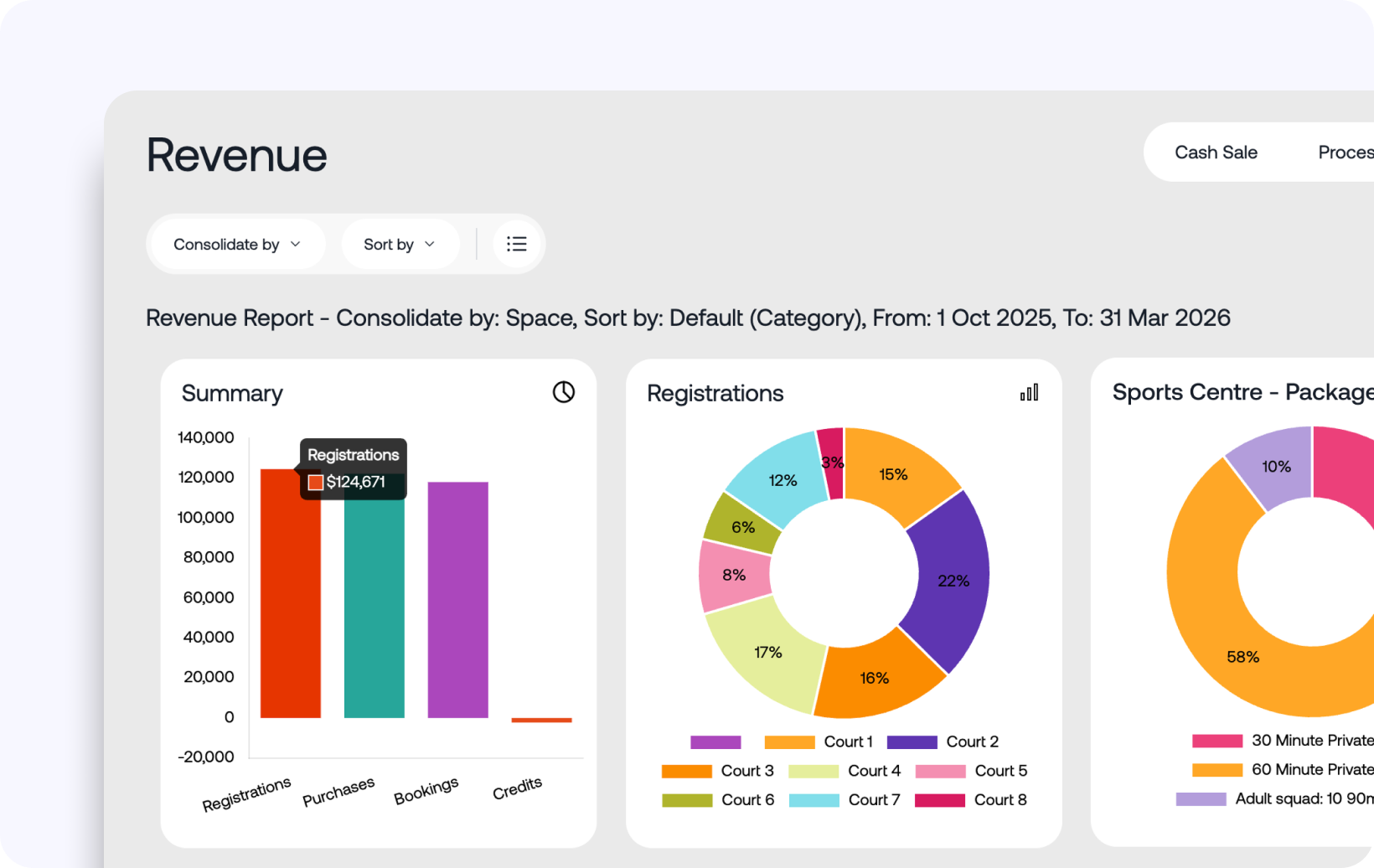
Software that looks good in a demo but doesn't reconcile cleanly at end of month creates ongoing manual work. Intrac keeps bookings, payments and reporting connected so the numbers match without extra reconciliation.
Intrac's finance reports tie bookings and payments together, so end-of-day and end-of-month reconciliation doesn't need a separate manual cross-check.
Bookings and payments connect directly, so the numbers match without extra work.
Plans run at 1.95%, 2.95% or 3.95% of monthly revenue, without a fixed-term contract.
Bring your trickiest records to the demo and see how enrolments, credits and family links would carry across before you commit.
The staff and parent experience matters as much as the back end
A powerful admin backend is wasted if front-desk staff find it slow during a busy changeover, or if parents find the booking and payment experience confusing enough that they call the office instead of self-serving online. Evaluate software from both ends: sit a staff member down with it during a trial, and have a parent actually try to book and pay for a class without help.
If either experience is clunky in a trial, it will be clunky in production, and it will generate support calls and front-desk friction every single day the facility is open.
Evaluating vendors: trial scope, support and exit terms
Before you sign anything, confirm exactly what a trial actually covers (a real trial with your own data beats a generic demo), what support looks like once you're a paying customer rather than a prospect, and, perhaps most importantly, what happens if you ever want to leave. A vendor confident in their product will be upfront about exit and data export terms; a vague answer here is itself useful information.
- List the core jobs your facility needs covered before comparing feature lists.
- Ask specifically how card data is handled under PCI DSS, not just whether the vendor is "compliant".
- Test migration against your trickiest real family records, not a demo account.
- Check that end-of-day and end-of-month reports actually reconcile without manual cross-checking.
- Confirm trial scope, support model and exit and export terms before signing.
If you're weighing up a switch, it's worth having that conversation directly rather than guessing from a feature comparison page. See Intrac's pricing and features, read customer stories from facilities that have made the switch, or book a demo and migration conversation to see what moving your own data would actually look like.